



10 Best Mobile Fire Inspection Software in 2026:
What You Should Know Before Buying?
Imagine your fire inspector completes a fire safety inspection on a commercial building, lists four deficiencies on a mobile device, and generates the inspection report before leaving the site. By the time they reach the next job, the customer has the report, and a proposal is already waiting for their approval. It may sound extraordinary, but it’s possible with the right fire inspection app on your mobile devices in 2026.
Key takeaways
- Test for true offline access before you buy.
- ZenFire auto-converts deficiencies to invoices.
- NFPA forms and smart scheduling are must-haves.
- ZenFire beats competitors with end-to-end flow.
- Valley Fire saved 5 hours daily with ZenFire.
Mobile fire inspection software can integrate with existing systems to streamline workflows and improve data management.
The market for fire inspection software has grown significantly. There are apps built specifically for fire protection professionals, apps adapted from generic field service platforms, apps that handle inspection processes cleanly but stop before they touch billing, and a handful that manage the full cycle from scheduling through to invoice. Automation systems within these platforms help manage operational processes and data, optimizing efficiency for fire protection businesses. These solutions support a range of operating systems, ensuring compatibility with devices like iPads and Windows tablets. Choosing the right fit for your fire protection business is difficult. Here is a complete guide to make that decision easier.
Mobile fire inspection software also allows for real-time collaboration and updates, ensuring all team members have access to the latest information. Additionally, it provides customizable checklists that can adapt to different inspection types and requirements.
What are the three things you should know before looking into any feature?
Most fire protection professionals end up buying the wrong fire inspection software or fire safety apps because they don’t know the questions to ask before buying. Here are the three questions that will keep you on track.
Is the App Really Built for Fire Safety Professionals?
Generally, fire inspectors work in basements, mechanical rooms, parking structures, and rural commercial properties where there is no reliable network. Some apps claim offline access, but the moment your technician loses signal, the app freezes or loses everything they just entered. Real offline functionality means the app keeps working exactly as normal, saves everything on the device itself, and the moment they are back to the internet connection, it all syncs up automatically.
This is not an advanced feature; this is the basic requirement of any mobile fire inspection app.
What Happens After a Deficiency is Flagged?
This is the question that separates a documentation tool from a business tool. Flagging a deficiency is step one. But if your app stops there, if converting that deficiency into a proposal, a work order, and eventually an invoice requires you to manually re-enter data somewhere else, your app is of no use.
Will it be the Fire Inspection App your Team Will Use?
Adoption comes from software that makes a field inspector’s day faster and easier. It happens because it’s fast, it makes sense, and it doesn’t slow people down when they’re on their fifth job of the day. If onboarding takes three weeks and the interface frustrates a field tech, the adoption rate will tell you everything. The best fire inspection app is the one your team opens without being asked.
How Do We Evaluate these Apps for Fire Professionals?
Six criteria drove every ranking on this list:
-
NFPA form coverage: Do they come ready to use, or does your team have to build everything from the ground up? Customizable checklists and dynamic rule sets allow for tailored inspection types and help ensure compliance with safety standards, reducing the risk values.
-
True offline access: Does “offline mode” just mean the app doesn’t crash?
-
Deficiency-to-invoice pipeline: How many manual steps sit between a flagged deficiency and a paid invoice?
-
Scheduling and dispatch: Can you set up recurring jobs, send reminders without thinking about it, and know where your crews are at any given moment?
-
Onboarding and adoption: For a team of 5 to 15 people, how long before nobody’s asking how to use it?
-
Price-to-value: Is it worth what it costs?
Additionally, the ability to configure different inspection types and checklists using dynamic rule sets is essential for compliance and workflow efficiency.
1. ZenFire
ZenFire is the platform built specifically for fire protection professionals with combined values. It is not a generic field service platform with fire inspection forms added on top. It is purpose-built fire inspection software designed around the specific workflows that fire protection professionals deal with every day, from conducting inspections in the field to closing out jobs in the office.
Key Features
Digital NFPA Checklists: Checklists are highly configurable components—they are more than just a list of violations. Pre-built, standardized forms covering a dynamic rule set of NFPA 10, 13, 25, 72, and 80 come ready on day one. Inspectors can also build custom checklists or modify existing ones to match specific inspection type requirements or local fire safety standards, with multiple checklists assigned to different inspection types as needed. ZenFire also supports self-certification, allowing business owners to independently verify and clear violations through the inspection checklist process.
True Offline Access: The full inspection application functions on a mobile device without an internet connection. All inspection data is locally stored and syncs automatically once connectivity is restored, whether that is over Wi-Fi or a mobile network.
Barcode and QR Scanning: Using ZenFire, field inspectors can scan asset tags directly from a mobile device, allowing inspectors to pull up complete service histories, last-inspection dates, and any open deficiencies.
Photo Documentation: This feature allows inspectors to take photos on a mobile device and attach them directly to individual inspection line items, not just to the overall report. Every deficiency entry has its own visual evidence, which strengthens documentation.
AI-Powered Inspection Detection: ZenFire uses AI to improve the accuracy of inspection. Identifying issues that might be missed during inspections and reducing callbacks and re-inspections from oversights.
Automatic Report Generation: It helps in generating inspection reports automatically as the inspection progresses. As the inspector leaves the property, the report is formatted, complete, and ready to send to the client and the AHJ without anyone typing it.
Deficiency to Proposal to Invoice Pipeline: When an inspector flags a deficiency, including final and associated inspection violations, ZenFire automatically generates a customer proposal for the repair work. Inspection violations are tracked and managed throughout the process, ensuring detailed documentation and compliance. Once the customer approves, it becomes a work order. Once the work is done, it becomes an invoice synced directly to QuickBooks.
Smart Scheduling and Dispatch: Drag-and-drop scheduling makes it easy to assign and reassign jobs. Automated reminders reduce no-shows and scheduling gaps. Recurring inspection series run on their own schedule without manual setup for each cycle.
Crew Management: This feature enables real-time tracking of technicians, job hours, and job completion status from any device.
Cloud Storage with AWS: All inspection reports, photos, checklists, and records are stored securely in cloud infrastructure, accessible from any device with an internet connection.
What Change ZenFire Really Brings?
Valley Fire Safety is a 4-person, family-owned fire protection business in Grottoes, Virginia. Before ZenFire, they were spending 5 to 6 hours every single day on administrative work, re-entering customer information across schedules and payment logs, typing up inspection reports by hand, and manually tracking job status across spreadsheets.
After switching to ZenFire, that time dropped to under an hour. The team reached 100 percent adoption in the first week, not because they were required to, but because the platform made their day easier from day one.
-
5-plus hours of daily administrative time recovered
-
100,000 dollars in estimated annual cost savings
-
100 percent user adoption from week one
-
Inspection reports and invoices that previously took hours now take minutes
We have changed almost everything about how we run our operations. Reports and invoices that used to take hours now take minutes. Everything we need is at our fingertips. — Katlyn, Service Manager, Valley Fire Safety.
It can be your success story. Book a free demo today. You might be surprised by the features.
2. Inspect Point
Inspect Point has built one of the most comprehensive NFPA template libraries available in any fire inspection app. If your business conducts a high volume of inspections across multiple fire safety systems and your team needs jurisdiction-specific forms that require zero setup, Inspect Point is a strong option for compliance-first operations. The platform enables you to track inspection violations, manage detailed documentation of violations found during inspections, and supports multiple inspection types with tailored checklists for each workflow.
Key Features
NFPA Template Library: Inspect Point offers a wide range of pre-built inspection forms covering multiple NFPA codes and fire safety systems. It has one of the deepest template libraries, covering common fire alarm systems and sprinkler systems, and supports dynamic rule sets for customizable inspection processes and checklists.
Mobile Inspection App: It has an iOS-focused mobile experience for fire professionals conducting inspections, which is designed for fast form completion, with support for photo documentation and field notes on mobile devices.
Compliance Reporting: It helps in generating structured inspection reports formatted for AHJ submission, with the code references and inspection data detail that state and local governments and compliance authorities expect.
Offline Mode: Using the Inspect Point mobile app, inspectors can complete fire inspections without an internet connection, with data syncing on reconnect.
Deficiency Tracking: Deficiencies and inspection violations are documented and tracked within the platform, with tools for managing follow-up and re-inspections.
Best Fit
It is a best fit for established fire protection companies conducting high-volume commercial fire safety inspections, and for the teams that work primarily on iOS mobile devices, who will find the experience well-suited to their workflow.
3. Service Trade
ServiceTrade is a mature field service management platform that is popular across commercial HVAC, mechanical, and fire protection operations. It has strong capabilities in service agreement management, customer communication, and multi-branch operations for large contracting businesses.
Key Features
Service Agreement Management: Service trade helps in tracking planned maintenance schedules, service contract terms, and customer-facing service histories with a level of detail suited to complex commercial accounts.
Mobile Field App: Using the mobile app, technicians can access job details, complete service records, attach photos to inspection reports, and update job status from mobile devices in the field.
Customer Portal: Commercial clients can view reports, service history, and pending work through a branded portal.
Scheduling and Dispatch: It has the features of job scheduling and technician dispatching with routing support and real-time reporting on job status.
Best Fit
Service Trade is a best fit for large contractors who are running fire protection alongside HVAC, mechanical, or other trades. It suits the teams with dedicated staff to manage form configuration and system setup, who will get the most value from it.
4. Uptick
Uptick is a field service management platform that was built with compliance management at its core. It covers scheduling, inspections, quoting, and invoicing, but it lacks AI-powered inspection tools. It has found a strong following among fire and safety businesses in Australia, New Zealand, and across the Asia-Pacific region.
Key Features
Fire-Specific Inspection Forms: Just like other apps, it has pre-built forms aligned with Australian and international fire safety standards, covering fire alarm systems and suppression systems.
Asset Management: It helps inspectors in tracking fire safety systems and equipment across buildings, with service history and compliance status maintained per asset.
Compliance Reporting: It generates inspection reports formatted for regulatory submission in the relevant jurisdictions.
Offline Capability: Using Uptick, inspectors can work through fire safety inspections without a network.
Best Fit
It is the best fit for fire protection businesses running in Australia, the UK, or other international markets.
5. SafetyCulture (iAuditor)
SafetyCulture is one of the most widely used inspection platforms in the world. It has over 100,000 inspection report templates, but no templates are pre-built for NFPA 25 or NFPA 72 in any meaningful depth.
Key Features
Extensive Template Library: It has more than 100,000 inspection and audit templates across industries, with a flexible form builder.
Mobile App: Safety Culture’s mobile app is available on iOS and Android mobile devices, with a clean interface.
Global and Multi-Language Support: It is designed for organizations operating across multiple countries. It has the language support that enables consistent inspection processes internationally.
Best Fit
It is the best fit for organizations that need a flexible platform with many functions beyond fire safety inspections.
6. BuildingReports
BuildingReports has built its reputation on one specific strength: creating a verifiable, scan-based documentation trail that holds up during AHJ review and compliance audits. Their barcode and NFC-driven approach to tracking fire safety systems creates detailed inspection records that fire safety professionals and property managers can rely on for accurate data over time. For property risk assessment, BuildingReports allows users to assign risk values to specific risk factors, which are then combined to calculate an overall property risk score for each property.
Key Features
Barcode and NFC Asset Scanning: It scans physical tags on fire safety systems and updates asset records, which helps in fast, accurate, and well-suited to properties with high equipment counts.
Compliance Reports: Unlike other software, it generates structured inspection reports with the documentation detail required for AHJ submission, including property risk assessment data and equipment-level service histories.
NFPA Form Coverage: It has pre-built inspection forms aligned with common NFPA compliance requirements for fire inspections.
Best Fit
It is best for fire protection companies and facility managers where AHJ compliance documentation quality and property risk assessment records are the top priority, and billing service and operations are managed through separate tools.
7. BuildOps
BuildOps is a field service management and project management platform built specifically for commercial contractors, including fire protection and security companies.
Key Features
Integrated CRM: BuildOps has integrated customer relationship management into the platform.
Inspect Point Integration: It has integration with Inspect Point, which connects NFPA-compliant inspection forms and compliance reporting directly into BuildOps’ workflow.
Real-Time Reporting and Analytics: Operational dashboards provide real-time reporting on job status, technician productivity, and revenue across the business, which is useful for managers overseeing large fire protection operations.
Best Fit
Best for contractors managing large technician crews and sophisticated service agreement programs.
8. GoAudits
GoAudits is built for scale and global coverage, which comes with strong multi-language support, advanced analytics, and a flexible inspection application. It is a capable platform for organizations running structured compliance programs across multiple countries and business units. Though it is not designed around fire-specific inspection processes.
Key Features
Multi-Language Support: It is available in multiple languages, which makes it a global software.
Custom Form Builder: Custom form builder allows teams to build custom checklists suited to their specific compliance requirements with the help of flexible drag-and-drop form creation for any inspection type.
Integration with Web Services: Go Audit has a strong integration with multiple programs, including Slack, Microsoft Teams, Microsoft App Store, and various business intelligence web services.
Best Fit
Go Audit is the best fit for large multinational companies with diverse compliance and quality inspection programs across multiple countries and departments.
9. InspectNTrack
Inspect N Track is built almost entirely around fire extinguisher inspection and equipment tracking. It can be a good fit for small fire protection companies or independent fire inspectors whose work is primarily focused on extinguisher servicing and maintenance.
Key Features
Inspection Forms: InspectNTrack comes with the forms designed around portable fire equipment compliance and the specific requirements of extinguisher inspections.
Service Reports: It generates inspection and service documentation per asset and per location, creating a record for AHJ and compliance purposes.
Offline Mode: InspectNTrack mobile app works without an internet connection, with locally stored data that syncs automatically.
Best Fit
InspectNTrack is specifically built for fire protection companies specializing in portable fire extinguisher inspection and maintenance, managing high asset volumes across many commercial accounts
10. First Due
First Due is a public safety platform built specifically for fire departments. It covers pre-incident planning, community risk reduction, and occupancy inspection management within a department’s database. First Due stores inspection data within the department’s database, often hosted on Microsoft Azure’s cloud infrastructure, ensuring secure and centralized data management. The platform uses Entity Framework for direct data access and synchronization between mobile devices and the department’s database, providing efficient and reliable data transfer.
After community risk reduction, First Due supports home fire safety inspections and community education initiatives, as well as weed abatement programs for nuisance vegetation control. It also offers incident management.
Key Features
Occupancy Inspection Management: Schedule inspections of occupancies within a fire department’s jurisdiction.
Pre-Incident Planning: It is best known for building information, property risk assessment data, fire safety systems locations, and hydrant data accessible to responding crews for pre-plan purposes.
NFIRS Incident Reporting: NFIRS-compliant incident reporting and analytics, which is designed for the reporting obligations of state and local governments, is one of the specific features it has.
Best Fit
First Due is the right tool for fire departments and public safety agencies that need a platform aligned with public sector operations, compliance reporting, and pre-incident planning.
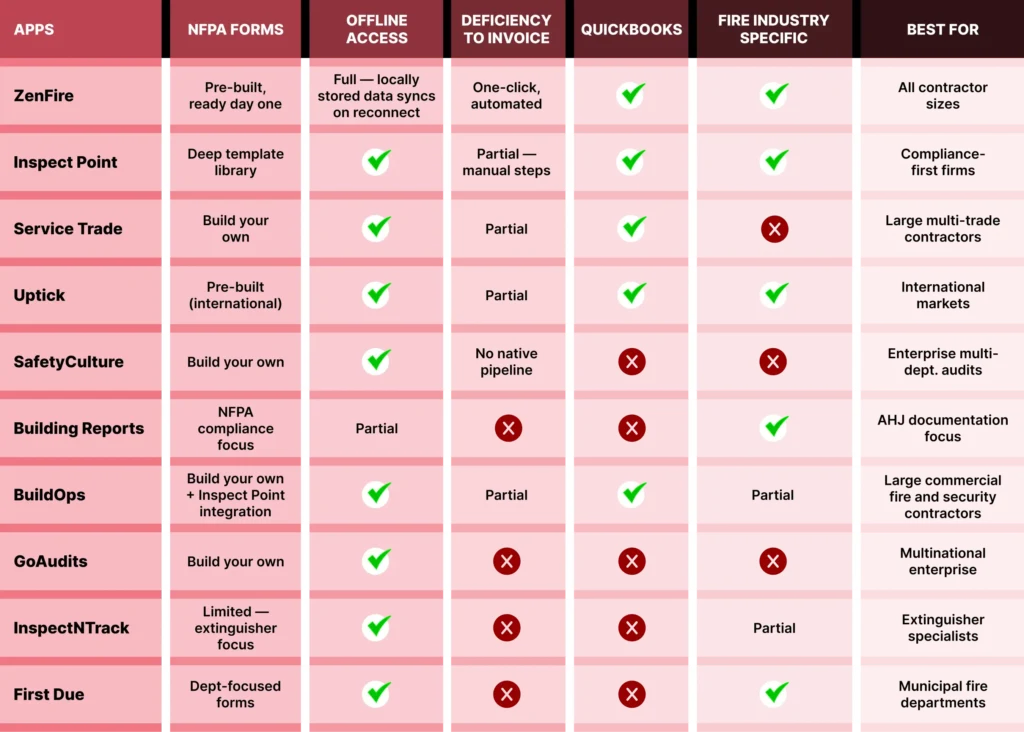
Side-by-Side Comparison of all 10 mobile fire inspection software(apps)
Some of The Frequently Asked Questions
What is the Best Fire Inspection Software for a small team?
For teams of 1 to 15 fire safety professionals, the priorities should be ease of onboarding, true offline access on mobile devices, and an end-to-end workflow that covers the full inspection process from scheduling through to invoice without requiring separate tools for fire inspections, proposals, and billing service. ZenFire was built specifically with small and growing fire protection contractors in mind. Valley Fire Safety operates with a 4-person crew and recovered more than 5 hours of daily administrative time after switching.
Which Fire Inspection Apps provide true offline access?
ZenFire, Inspect Point, and Uptick all provide genuine offline access for conducting inspections without an internet connection. The important distinction is whether offline access means the full inspection application functions and stores data locally, or whether it means limited basic functionality with certain features unavailable. Always test offline access specifically in a real environment before committing to any inspection software.
Can a Mobile Fire Inspection Software automatically convert deficiencies into proposals?
ZenFire does this natively. A deficiency flagged during fire inspections automatically generates a proposal for violations repairs, which flows into a work order on approval and then into a QuickBooks-synced invoice on completion without manual re-entry at any step.
How long does it take to switch to Fire Inspection Software?
For a team of 5 to 15 people, plan for two to four weeks from start to full operational use. ZenFire’s onboarding is designed to be fast. Valley Fire Safety reached 100 percent user adoption in the first week. The key is to avoid switching mid-peak season and to allow a short overlap period where both platforms are running before going fully live on the new inspection software.
Does Fire Inspection Software work on Windows mobile and tablet-based devices?
Most modern fire inspection apps, including ZenFire, are designed for mobile devices. Some fire inspection software is Windows Mobile Tablet-based, supporting Windows tablets alongside iPads. ZenFire runs on any current iOS mobile device, with no installed software required on the device beyond the app itself.
How is Fire Inspection Software different from General Field Service Software?
General field service platforms handle scheduling, dispatch, and invoicing across multiple trades. Fire inspection software does all of that and adds pre-built NFPA compliance forms, AHJ-ready inspection reports, inspection data management specific to fire safety systems, deficiency-to-invoice automation, and historically accessible records for re-inspections and compliance audits. If you are running a fire protection contracting business, a general field service platform will require significant configuration to approximate what purpose-built fire inspection software provides out of the box.
Which Fire Inspection Apps provide true offline access?
ZenFire, Inspect Point, and Uptick all provide genuine offline access for conducting inspections without an internet connection. The important distinction is whether offline access means the full inspection application functions and stores data locally, or whether it means limited basic functionality with certain features unavailable. Always test offline access specifically in a real environment before committing to any inspection software.
Can Fire Inspection Software automatically convert deficiencies into proposals?
ZenFire does this natively. A deficiency flagged during fire inspections automatically generates a proposal for violations repairs, which flows into a work order on approval and then into a QuickBooks-synced invoice on completion without manual re-entry at any step. Most other inspection software requires at least some manual action in this process. rm handles this workflow before deciding.
Does fire inspection software work on Windows mobile and tablet-based devices?
Most modern fire inspection apps, including ZenFire, are designed for mobile devices. ZenFire runs on any current iOS mobile device, with no installed software required on the device beyond the app itself.
The Bottom Line
The contractor who needs to schedule inspections, conduct them on an iPad-based field inspector setup or a mobile device, generate a compliant report before leaving the building, and convert every flagged deficiency into a proposal without anyone in the office chasing it manually, that contractor is not looking for a platform that covers one piece of the picture. They need a platform where every piece connects.
What Separates ZenFire From Everything Else on This List?
ZenFire was built to streamline inspections from the moment a job enters the schedule to the moment an invoice is created. The combined values of true offline reliability, AI-powered inspection accuracy, automatic report generation, and a connected deficiency-to-revenue pipeline make it more than an inspection application; they make it a complete business operations system for fire protection contractors of any size.
When a mobile device communicates in real time with the back office, the business owner gains direct data access to every job in the pipeline, what is scheduled, what is in progress, what has been invoiced, and what still needs attention. The platform generates events at every stage of the workflow, from initial inspection through re-inspections, proposal approval, work order creation, and final invoice.
For field teams, allowing inspectors to pre-plan their routes, add inspections on the fly, and work over Wi-Fi or cellular without losing a single entry means the operation never stops because of a coverage gap. Locally stored data syncs the moment connectivity is restored. The inspection application runs the same whether a technician is connected or not, a distinction that sounds small until you are standing in a basement with no signal and a full day of jobs ahead.
Ready to transform your business? Book a free demo with ZenFire now.