



5 Powerful Uptick Alternative to Streamline Your Fire Protection Business
Running a fire protection business means you cannot afford software that slows your team down. If you have been using the Uptick platform, you may find yourself dealing with automatic price increases, clunky admin work, or a support team that takes too long to respond. Fire protection companies across the fire and security sector are actively looking for a powerful uptick alternative to streamline their fire protection business.
Key takeaways
- Switch from Uptick for better pricing and support.
- ServiceTrade and BuildOps lack fire-specific depth.
- Test offline mode in basements before buying.
- Select alternatives based on compliance needs.
- ZenFire offers the strongest offline fire access.
Leading uptick alternatives offer efficient scheduling and route-optimization tools, helping technicians maximize productivity.
This guide reviews the 5 best Uptick alternatives available in 2026, starting with one of the best, which offers all the features and capabilities the fire protection industry truly needs. Top alternatives also provide prompt, knowledgeable customer support, with quick response times and dedicated teams.
Why Fire Businesses Are Switching from Uptick?
Uptick has served the fire and security sector for years, particularly in international markets like Australia and the UK. But as more businesses in North America look for purpose-built fire inspection software, the gaps are becoming harder to ignore.
Here is what fire protection business owners most commonly report while using Uptick:
Automatic price increases that arrive without warning disrupt cash flow planning.
Bulk management of inspection forms feels rigid, making it difficult to customize forms for specific customer needs.
The support team’s response times can be slow, leaving technicians stuck on site without answers, whereas competitors provide responsive customer support no matter how small the query.
The Uptick app lacks the seamless offline mode that fire inspectors need in basements and remote sites.
Some users have found the Uptick team less responsive compared to competitors with global support teams.
If any of these are found similar to you, here is the list of alternatives you can explore and find out which serves you the best.
Leading alternatives are designed to scale as your business grows, supporting expansion without constraints.
1. ZenFire
If you are searching for fire inspection software that was built specifically for the fire protection industry and not adapted from a generic field service platform, ZenFire is the answer. ZenFire is a comprehensive system that automates quoting, invoicing, and billing, and integrates seamlessly with accounting software to streamline your workflow and improve efficiency. Like leading uptick alternatives, ZenFire is fully cloud-based, allowing access across all devices for both admins and technicians, so your team can work efficiently from anywhere, even offline. It is purpose-built, technician-friendly, and designed to handle the full cycle of a fire protection business from scheduling through to invoice without a single piece of paper or duplicate data entry.
Key Features of ZenFire:
Digital NFPA Inspection Forms
Pre-built inspection forms for NFPA 10, 13, 25, 72, and 80 are ready from day one. Inspectors can also customize forms for specific customer requirements or site requirements, with drop-down lists and configurable fields that make data entry fast and accurate.
Deficiency to the Invoice Pipeline
When a technician flags a deficiency on site, ZenFire automatically generates a proposal. Once the customer approves it directly through the customer portal, it becomes a work order. Once the work is complete, it becomes an invoice. Which requires no re-entry, no admin work.
Customer Portal
Customers can approve quotes online, view service history, access compliance reports, and track open jobs. This feature alone significantly reduces inbound support calls and improves response times.
AI Scheduler
ZenFire’s AI scheduler automatically assigns extra jobs nearby based on technician location, skills, and availability. Like Uptick, ZenFire provides route optimization to help create efficient schedules and allows recurring inspections to be scheduled in advance. It eliminates manual dispatching decisions and helps your team squeeze more productive jobs every week, directly improving cash flow.
True Offline Mode
The ZenFire mobile app functions completely in offline mode, allowing technicians to perform inspections even in areas with poor connectivity. All inspection data is stored locally on the device and syncs automatically the moment connectivity is restored. The ZenFire mobile app is available on iOS, allowing technicians to work on smartphones and tablets. Whether your technician is in a basement, a rural site, or anywhere with no signal.
Recurring Inspections Automation
Once you set up recurring inspections, ZenFire runs the schedule for you. Automated reminders go out to clients, technicians get their routes, and inspection reports are generated automatically. It is how small businesses compete like large operations.
Configurable Billing Options
Unlike the UpTick platform, ZenFire offers configurable billing options with no automatic price increases. ZenFire offers a user-based pricing model. It builds over ten features every 2 weeks and does not charge extra for new feature development. You are in control of your pricing, your invoices, and your cash flow at all times.
What ZenFire Delivers That Uptick Can't Match
The combination of an AI scheduler, true offline mode, automated deficiency-to-invoice pipeline, and configurable billing options in a single platform makes ZenFire the most complete fire inspection software available for businesses in the fire and security sector. While Uptick handles inspections, ZenFire handles your entire fire protection business.
When comparing onboarding processes, it’s important to note that Uptick’s onboarding process varies depending on the size of your team and their training requirements. While with ZenFire, your team doesn’t need days.
Best For
Fire protection businesses of any team size, from solo inspectors to multi-technician operations across the fire and security sector. ZenFire supports users with live onboarding sessions for both admins and technicians, similar to Uptick, and provides hands-on training to ensure users can effectively use the software.
2. Service Trade
ServiceTrade is a well-established field service management platform used across commercial HVAC, mechanical, and fire protection operations. It has strong capabilities in service agreement management, customer communication, and large-scale multi-branch operations. If your business runs fire protection alongside other trades and you need a platform that manages all of them under one roof, ServiceTrade is worth evaluating.
Key Features of Service Trade
It offers service agreement management for complex commercial accounts.
Customer portal for viewing service history and inspection reports.
Mobile app for technicians to access job details and update status on site.
QuickBooks integration for billing and cash flow management.
Limitations for Fire Protection Businesses
ServiceTrade was not designed specifically for recurring inspections in the fire protection industry. Security businesses and fire-only contractors will spend significant time configuring the platform before it handles compliance reports and inspection forms at the level a purpose-built tool provides out of the box. Admin work remains high compared to ZenFire.
3.Fieldd
Fieldd is a mobile-first field service management platform designed around fast scheduling, location-aware dispatching, and smooth customer booking experiences. It has found a following among small service businesses that prioritize speed and a clean mobile experience over deep compliance features.
Fieldd is not built for the fire protection industry. It has no pre-built NFPA inspection forms, no fire-specific compliance reports, and no deficiency management pipeline. For security businesses or fire protection companies running a small number of service jobs, it may serve as a basic operations tool. But for businesses where inspection reports, compliance, and recurring inspections are central to daily operations, Fieldd will require significant workarounds
Key Features of Fieldd
Real-time scheduling and route optimization with mobile-first design.
Fast customer booking experience, clients can book in under two minutes.
Digital invoicing and payment tracking through the mobile app.
Available on iOS and Android mobile devices.
Limitations for Fire Protection Businesses
There are no NFPA inspection forms, no fire-specific compliance workflows, limited invoice customization, and pricing that starts at $199 per month for the entry plan, which is higher than many purpose-built fire inspection software options.
Best For
Fieldd is best for small mobile service teams that primarily need fast scheduling and customer communication, and handle compliance through separate tools.
4.SafetyCulture (iAuditor)
SafetyCulture is one of the most widely used inspection platforms in the world. It offers a flexible form builder, strong collaboration features, and broad mobile device support. For large organizations running safety and compliance programs across multiple departments and regions, it is a capable platform.
But it has no pre-built NFPA inspection forms, no fire-specific deficiency management, and no AHJ submission tools. There is no native deficiency-to-invoice pipeline, which means data entry does not reduce, and admin work does not shrink when you switch from UpTick to SafetyCulture.
Key Features of SafetyCulture
Mobile app available on iOS and Android with offline mode support.
Offers real-time collaboration and task assignment across teams.
Provides a flexible custom form builder for any inspection type across multiple industries.
It has strong analytics and reporting dashboards for compliance tracking.
Limitations for Fire Protection Businesses
Fire inspectors will not find NFPA checklists, compliance reports formatted for AHJ submission, or tools that understand recurring inspections in the fire and security sector, as it is a generic platform. The positive impact it has on operations is real for multi-industry enterprises, but for a focused fire protection business, it is not a purpose-built solution.
Best For
Proves to be a best fit for Large enterprises running diverse safety inspection programs across multiple departments, where fire inspection is one component of a broader compliance platform.
5. BuildOps
BuildOps is an operations management platform purpose-built for commercial contractors, including companies operating in the fire and security sector. It covers dispatch, project management, CRM, and invoicing.
Key Features of BuildOps
It has an integrated CRM for managing customer relationships and sales pipelines.
Project management tools for large installation and service contracts.
Comes with QuickBooks integration for cash flow and billing management.
In built Customer portal for service history and quotes.
Limitations for Fire Protection Businesses
BuildOps was not designed with fire-specific inspection workflows at its core. The platform is particularly built for large-scale commercial operations management, not for the day-to-day inspection processes that define most fire protection businesses.
Best Fit
Can be a perfect fit for large commercial fire and security contractors managing multi-trade operations, project installations, and significant technician teams who plan to pair it with a dedicated inspection platform.
Side-by-Side Comparison of Uptick Alternatives
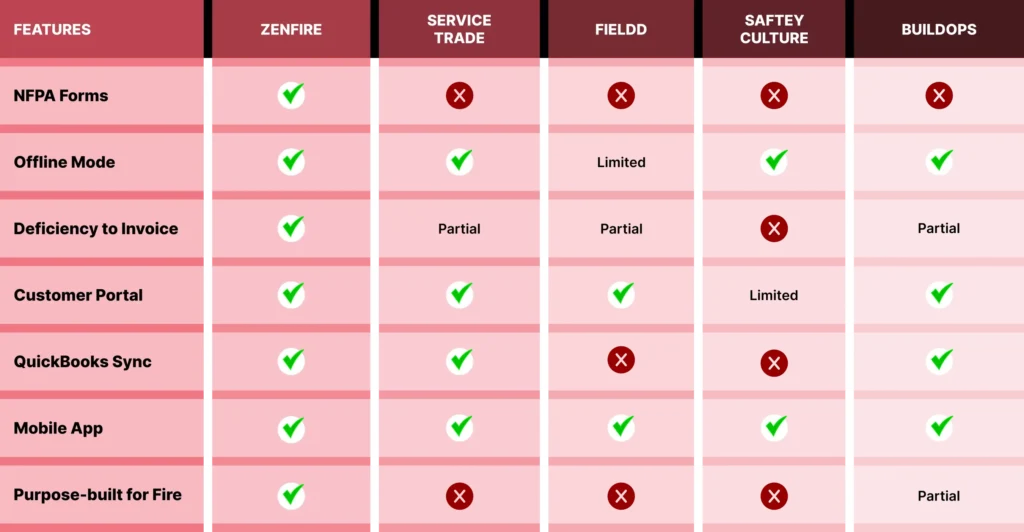
How to Choose the Right Uptick Alternative for Your Fire Protection Business?
Not every fire protection software fits every business. It’s really important to choose the software that is built for your business.
When evaluating a Uptick alternative, consider the onboarding process and training requirements. Uptick’s onboarding process typically takes 2+ months, depending on team size and training requirements, which is longer than some competitors. Some alternatives offer faster onboarding, allowing your company to be up and running more quickly. User feedback and onboarding tools are also important factors, as they influence how easily users can adapt to the platform and how well the software supports different user roles.
If you run a small or growing fire protection business (1–15 technicians)
You need software that is easy to adopt, handles recurring inspections automatically, runs in offline mode without fail, and converts deficiencies to invoices without adding admin work. ZenFire was built specifically for you.`
If you manage a large multi-trade operation
ServiceTrade or BuildOps may be worth exploring, with the understanding that you will need to configure fire-specific workflows manually or pair the platform with a dedicated inspection tool. The operational breadth is there, but no fire inspection depth.
Final Thoughts
Which UpTick Alternative Should You Choose?
There are strong platforms on this list, and the right choice depends on your business model, team size, and the specific frustrations you are trying to solve. But if your fire protection business needs a single platform that handles every step, from scheduling and inspection reports to deficiency management, customer approvals, and invoicing without requiring a second tool or a large admin team to make it work, ZenFire can be the best choice for you.
ZenFire is purpose-built for the fire and security sector. Its AI scheduler, true offline mode, automated deficiency-to-invoice pipeline, configurable billing options, and customer portal give fire protection businesses the tools they need to increase efficiency, reduce admin work, improve response times, and grow without friction. No other platform on this list combines fire-specific depth with the operational completeness that ZenFire brings to businesses of nearly every size.
If you are ready to move beyond Uptick and streamline operations across your entire fire protection business, book a free demo now and see how ZenFire can really help your business grow.