



Top 10 Fire Inspection Software for Fire Protection Businesses in 2026
In this highly competitive market for fire protection businesses, using fire inspection software has become a necessity. Identifying the right fire inspection software is crucial when there are multiple options. Not all fire inspection software is the same. Some are too complex to use, some are too generic, and some do not understand the fire protection industry. Here are the top 10 fire inspection software solutions in 2026 to help you choose the perfect one.
Key takeaways
- Avoid generic apps that lack fire safety knowledge.
- Use ZenFire for purpose-built NFPA compliance.
- Compare tools like ServiceTrade for specific depth.
- Pick software based on workflow, not just price.
- Ensure your choice fits your specific team size.
What is Fire inspection software?
Before diving into the guide, it’s important to understand fire inspection software. Fire inspection software is the control centre that streamlines workflows for fire safety professionals, enabling them to conduct comprehensive inspections, generate detailed reports, and manage data more efficiently than traditional methods.
1. ZenFire
ZenFire is fire-protection software built exclusively for fire-protection companies with an intuitive interface. Unlike generic field service tools, every feature in ZenFire is designed around how fire protection businesses actually operate, from NFPA-compliant inspections to recurring scheduling and same-day invoicing. It is one of the most complete and industry-specific platforms available in 2026.
Key features of ZenFire
Smart Scheduling: The biggest challenge fire protection businesses face is managing the busy inspection calendar manually. ZenFire eliminates that challenge with smart scheduling tools. You can schedule fire inspections, whether it is an initial inspection, a recurring inspection, or an annual inspection. Your entire inspection process is digitized on ZenFire.
You can assign jobs to the right inspector based on their availability and location, send reminders to both technicians and clients, and ensure no appointment is ever missed. For fire protection professionals, managing dozens of jobs a week is not easy. This type of specialized tool is not an advancement; it’s a necessity.
Mobile App: ZenFire’s mobile app is built specifically for the fire protection professionals who are in the field most of the time, not in the back office. Using their mobile devices, technicians can access full job details, work through pre-built inspection templates tailored to fire alarm systems, fire sprinkler systems, and fire suppression systems, capture photo evidence, and submit completed inspection reports, all without stepping back into the office.
The app also supports offline capabilities, meaning your team can complete the entire inspection process even in areas with limited connectivity or no Wi-Fi. Once you are back online, all inspection data syncs automatically to the central system, keeping your office team fully informed in real time.
National Fire Protection Association-Compliant Reporting: In the fire and life safety industry, compliance documentation is a legal requirement. ZenFire’s reporting capabilities are built around the standards set by the National Fire Protection Association (NFPA), ensuring every inspection report your team generates meets the required safety standards.
Instant Invoicing: One of the biggest problems the fire protection industry faces is invoicing. Invoicing is one of the most time-consuming tasks for most fire protection companies. Once the inspection is complete, the last thing a technician or office manager wants to do is sit down and manually build invoices from scratch, cross-referencing job notes, calculating ZenFire’s, and chasing down missing details.
ZenFire’s instant invoicing feature eliminates this problem by converting completed inspection data directly into a professional invoice in just a few clicks. All the job details, services performed, parts used, time spent, and inspection history are already captured in the system from the moment the technician completes the job.
ZenFire significantly shortens the gap between completing a job and receiving payment, improving cash flow across your entire business lifecycle.
Seamless Data Management: Data management is essential in the fire inspection business. Managing inspections, sorting customer lists, or saving relevant historical data can be a headache for management teams. Zenfire allows the back office team to manage the data in one place. It not only allows managers to gather all information in a single place but also enables technicians to access the information they need through mobile apps. ZenFire’s centralized client portal keeps every stakeholder informed throughout the job, leading to strong customer relationships.
Streamlined Operations: Beyond individual features, ZenFire is designed to streamline the entire workflow of a fire protection business, increasing operational efficiency. Workflow automation across scheduling and dispatching, inspection processes, reporting, invoicing, and customer communication means your team spends less time on administrative tasks and more time on billable work.
Integration: ZenFire integrates seamlessly with existing workflows and existing systems, including QuickBooks, Stripe, Gravity, and The Compliance Engine, so your team does not have to abandon the tools they already use.
24/7 Customer Support: ZenFire’s dedicated support team is always available. Whether it’s Saturday evening or Sunday morning, ZenTrades customer support executives are available at all hours of the day, seven days a week, ensuring you provide the best service without any problems or delays.
What is ZenFire best for?
ZenFire is the best fire inspection software for fire protection companies of all sizes, from small commercial contractors to large multi-crew operations managing hundreds of client sites. It is specifically built for fire protection professionals seeking a single platform to manage the entire business lifecycle, including scheduling and dispatching, fire safety inspections, compliance reporting, invoicing, and customer communication.
Whether it is a fire alarm system, fire sprinkler system, fire suppression system, or conducting routine fire safety equipment inspections, ZenFire is designed to handle all fire safety systems without any limitations of general inspection software.
Pricing
ZenFire offers custom pricing tailored to your business’s size and requirements. This means you are not paying for features you do not need. Book a free demo to speak with the ZenFire team and receive a pricing proposal tailored to your specific needs.
2. Service Trade
ServiceTrade is a field service management platform widely used by commercial service contractors, including fire protection companies. It offers a set of features for managing jobs, technicians, and customer communication, though it is not built exclusively for fire protection.
Key features of Service Trade
Scheduling Tools: ServiceTrade gives office teams a clear, centralized view of all upcoming jobs, technician availability, and service schedules. Clients can request services online, reducing the back-and-forth of manual booking and making the entire scheduling process faster and more efficient for both your team and your customers.
Customer Portal: One of ServiceTrade’s special features is its customer-facing portal, which gives clients direct access to their service history, completed inspection reports, and upcoming scheduled visits. This level of transparency builds trust and reduces customer support calls.
Mobile App for Field Technicians: ServiceTrade’s mobile app lets field technicians access job details, review service histories, complete work orders, and capture photos directly on their mobile devices. While Service Trade’s mobile app covers all the basics well, it is not specifically designed for Fire protection professionals, as it does not include NFPA compliance requirements.
Recurring Service Management: Service Trades’s recurring service management tools make it easy to set up repeat jobs, track completion ensuring no inspection is left behind.
Digital Quotes and Invoicing: ServiceTrade allows technicians and office staff to generate digital quotes on-site and quickly convert completed jobs into invoices. But not as instant as purpose-built fire-inspection software is.
What is Service Trade Best for?
ServiceTrade is best suited for mid- to large-sized commercial service contractors that handle multiple trades, such as companies that manage HVAC, plumbing, electrical, and fire safety inspections under one roof. However, fire protection companies that need deep NFPA compliance tools, fire-specific inspection forms, or a platform built exclusively around fire and life safety operations may find ServiceTrade’s general inspection software approach limiting compared to purpose-built alternatives like ZenFire.
Pricing
Pricing scales with the number of users and the features required, starting at approximately $99.
3. Inspect Point
InspectPoint is a purpose-built fire inspection software designed specifically for fire inspection and service companies. It is known for its detailed inspection workflows and NFPA code compliance tools. Unlike general field service management platforms that try to serve multiple trades at once, InspectPoint is focused entirely on the needs of fire protection professionals, making it one of the specialized tools available in the fire and life safety industry today.
Key features of Inspect Point
NFPA Code-Based Inspection Forms: InspectPoint’s inspection forms are built directly on NFPA codes, providing fire inspectors with a structured, code-compliant framework for every inspection they conduct.
Mobile App for Field Technicians: InspectPoint’s mobile app is designed specifically for fire inspectors working in the field. Technicians can access their full job schedule, review inspection history for each client site, work through digital inspection checklists on-site, capture photos of deficiencies, and submit completed inspection reports directly from their mobile devices.
Integrations with QuickBooks and Stripe: InspectPoint integrates with QuickBooks for accounting and financial management, and Stripe for payment processing. These integrations allow fire protection companies to keep their inspection data and financial data connected without manual data entry, helping to speed up the invoicing cycle and reduce billing errors across the business.
What is Inspect Point Best for?
InspectPoint is best suited for fire inspection and service companies that place a strong emphasis on NFPA compliance, detailed deficiency reporting, and structured inspection workflows. However, businesses looking for a more complete end-to-end platform that also covers advanced scheduling and dispatching, workflow automation, asset management, and deeper integrations may want to evaluate whether InspectPoint’s more inspection-focused approach covers all of their operational needs.
Pricing
Custom plans available depending upon the team’s size.
4. Uptick
Uptick is a field service management platform that was built with compliance management at its core. It covers scheduling, inspections, quoting, and invoicing, but it lacks AI-powered inspection tools. It has found a strong following among fire and safety businesses in Australia, New Zealand, and across the Asia-Pacific region.
The platform integrates with accounting tools that are particularly common in the Asia-Pacific region, making it a practical fit for businesses in those markets. For fire protection companies based in the United States or other regions, the platform’s regional focus and the absence of NFPA-specific compliance tools may pose limitations worth considering before committing.
Key Features of Uptick
Customizable digital inspection forms and structured checklists.
Compliance and deficiency tracking with photo capture.
Mobile app with offline functionality for on-site reporting.
Automated scheduling and recurring job management.
Asset and equipment management across client sites.
What is Uptick Best for?
Uptick works well for fire and safety businesses in Australia and the Asia-Pacific region that need a compliance-focused platform with strong local accounting integrations.
Pricing
Custom pricing based on team size and requirements. Contact Uptick directly for a quote.
5. Inspent N Track
Inspect N Track is built almost entirely around fire extinguisher inspection and equipment tracking. It can be a good fit for small fire protection companies or independent fire inspectors whose work is primarily focused on extinguisher servicing and maintenance. This focused approach makes the platform accessible, affordable, and easy to get started with.
Key Features of Inspect N Track
Barcode and QR code scanning for fast equipment identification and tracking.
Inspection scheduling with automated reminders.
Basic reporting and digital record keeping for service history.
Mobile app for completing inspections and logging results in the field.
Customer management tools for tracking client accounts and site details.
What is Inspect N Track Best for?
Inspect N Track suits small fire protection companies and independent fire inspectors focused specifically on fire extinguisher inspections.
Pricing
Starts at approximately $30 per month, making it one of the most affordable entry points on this list.
6. Ember
Ember is fire-protection software that positions itself as a clean, accessible option for smaller fire-protection businesses looking to move away from manual processes without the complexity of a large-enterprise platform. For businesses in the early stages of digital adoption, Ember provides a workable foundation. However, fire protection companies that are growing quickly, managing multiple crews, or operating across a large portfolio of commercial client sites may begin to outgrow Ember’s capabilities and need a more comprehensive platform as their volume and complexity increase.
Key Features of Ember
Inspection scheduling and technician dispatching.
Digital inspection forms and structured checklists.
Customer and asset management tools.
Mobile app for field inspectors.
Basic invoicing and QuickBooks integration.
Pricing
Custom pricing. Contact Ember directly for details.
7. Fire Inspection 360
Fire Inspection 360 is a platform focused on inspection and reporting for fire protection operations. Its primary role is in helping fire protection companies digitize their inspection process, generate professional reports, and give clients access to their documentation, all without the complexity of a more expansive operational platform.
Key Features of Fire Inspection 360
Customizable digital inspection forms.
Automated inspection report generation.
Client portal for sharing completed reports.
Basic job scheduling and management.
Mobile-friendly interface for field use.
What is Fire Inspection 360 Best For?
Fire Inspection 360 suits fire protection companies with a straightforward need for digital inspection forms and automated reporting.
Pricing
Custom pricing. Reach out directly for a quote.
8. Streamline Inspection Solutions
Streamline Inspection Solutions is a field service platform designed with flexibility in mind, catering to companies that conduct multiple types of inspections, not exclusively fire protection.
Key Features of Streamline Inspection Solutions
Flexible inspection forms adaptable to multiple inspection types.
Scheduling and technician dispatching tools.
Mobile app for field technicians.
Basic reporting and record keeping.
QuickBooks integration for accounting.
What is Streamline Inspection Solutions Best for?
Streamline suits companies conducting multiple types of inspections alongside fire protection work, making it a good fit for such companies.
Pricing
Custom pricing based on scope and team size.
9. Life Safety Inspector
Life Safety Inspector is a platform focused on life safety and fire inspection teams. It covers the core needs of inspection management and compliance documentation, with an industry awareness level that generic field service platforms often lack. For teams whose primary focus is conducting life safety system inspections and maintaining accurate compliance records, Life Safety Inspector offers a targeted toolset.
Key Features of Life Safety Inspector
Life safety and fire inspection checklists.
Deficiency tracking and compliance documentation.
Mobile inspection tools for field use.
Scheduling and follow-up tracking.
Basic reporting and audit record keeping.
What is Life Safety Inspector Best for?
Life Safety Inspector is built for inspection teams focused on life safety systems, who need a structured, compliance-oriented tool for their inspection workflows. Fire protection businesses that also need to manage scheduling, invoicing, asset management, and client communication within a single platform will benefit from a more comprehensive operational solution like ZenFire.
Pricing
Custom pricing. Contact them directly for details.
10. First Due
First Due is a platform built primarily for fire departments and public safety agencies rather than private fire protection companies. It has strong capabilities in pre-incident planning, fire safety inspections, occupancy management, and public-sector compliance reporting.
Key Features of First Due
Pre-incident planning and fire inspection tools for public safety use.
Occupancy management and fire safety records.
Compliance tracking and regulatory reporting.
Mobile app for in-field inspections.
Integrations with government and public safety tools.
What is First Due Best for?
First Due is the right tool for fire departments and public safety agencies that need a platform aligned with public sector operations, compliance reporting, and pre-incident planning.
Pricing
Custom pricing. Contact First Due directly for a quote.
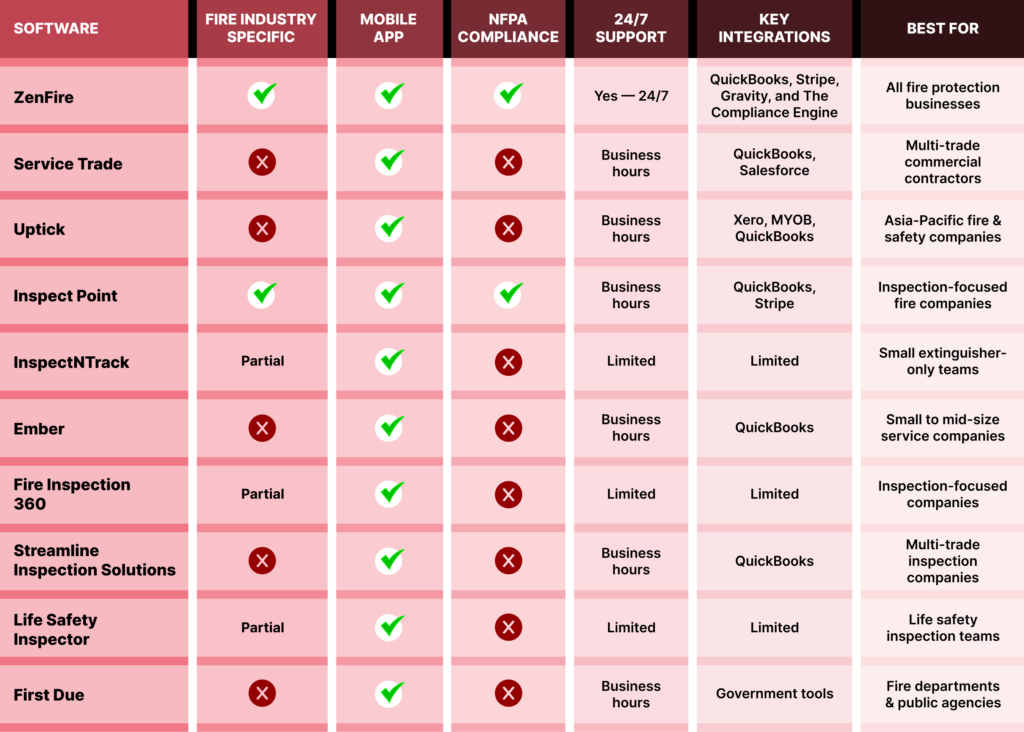
Side-by-Side Comparison of All 10 Platforms
Why ZenFire Stands Apart From Every Other Platform on This List?
Every platform reviewed in this guide has something to offer. Some handle scheduling well while others are strong on compliance reporting. But when we look at the full picture, ZenFire is the only platform that checks every box without compromise. Whether it is:
Purpose-built for fire protection businesses.
End-to-end operational coverage.
NFPA compliance.
24/7 support.
Integrations with other platforms.
ZenFire was built for one industry: fire protection. It was not taken from another field service tool and adjusted to fit. Every part of the platform, from the inspection checklists to the scheduling tools, was designed around how fire protection businesses actually operate.
Final Thoughts
Fire protection is something where responsibility comes before business. Every inspection conducted by fire investigators helps keep people safe. It is the responsibility of life safety companies to make sure fire incidents can be eliminated. This kind of work not only deserves but also needs automation.
There are 10 tools mentioned on this list. But if you are looking for a platform built specifically for fire professionals, for inspection tracking with reliable support, with operational efficiency, without limited industry-specific features, the answer becomes clear.
ZenFire is not the best option because it has most of the features, but it is the best option because it was built for your industry, understands your workflow, and was designed to make every part of running a fire protection business simpler, faster, and more professional from the first inspection to the final payment.
If you are ready to streamline your business with the most suitable platform for your fire and security companies, book a free demo today. You might be surprised by the features.