



APX Fire Software Alternatives For Fire Protection Companies In 2026
APX Fire Software is not a fire inspection platform for private fire protection companies. It is a records management system built for municipal fire departments, designed around pre-incident planning, NFIRS reporting, fire investigation, incident mapping, and hydrant management. If you run a fire protection company and are looking for an APX Fire software alternative that helps you in handling fire sprinkler inspections, fire alarm testing, extinguisher servicing, deficiency tracking, and client billing, you are on the correct page.
Key takeaways
- APX Fire Software suits Fire departments, not private inspections.
- ZenFire offers NFPA forms, AI scheduling, deficiency-to-invoice flow.
- ZenFire’s 4.8/5 Capterra rating leads for fire support/workflows.
- Fire protection businesses need offline mode, customer portals, and integrated billing
- Pick purpose-built over fire department software.
This blog explains what APX Fire Software was actually built for, what fire protection companies need instead, and the five best fire inspection software platforms available in 2026. Read through, understand the difference, and choose the platform that was built for how your business actually works.
What Is APX Fire Software Actually Built For?
APX Fire Software, developed by APX Data, is a cloud-based, mobile-first fire records management system built specifically for municipal and career fire departments. Its CityScape product suite includes SmartCapture for pre-incident planning, SmartMap for real-time mapping and hydrant access, SmartInspect for fire code compliance inspections conducted by fire marshals, SmartInvestigate for NFPA 921-aligned fire investigation, and SmartCheck for fire apparatus management. Every product in the suite is designed to help fire departments reduce risk, improve emergency response preparedness, and share mission-critical data across stations and mutual-aid partners.
But here is what APX Fire Software was never designed to do
Generate branded, client-facing fire inspection reports for commercial property owners who are paying for a private fire protection service.
Automate recurring fire inspection schedules across dozens or hundreds of private commercial accounts and send client notifications automatically.
Convert deficiencies flagged during inspections into proposals, work orders, and invoices inside one platform.
Give commercial clients a self-service portal to review their compliance records, approve proposals, and track open service jobs.
Track job profitability, manage crew assignments, and process online payments for inspection services.
Optimize daily technician routes using AI-powered scheduling based on job locations and inspection priorities.
Fire protection companies are private businesses. You bill clients for inspections and deficiency repairs, manage recurring schedules across commercial properties, need technicians in the field working efficiently, and your office team converts completed inspections into revenue without chasing paperwork. That is an entirely different set of problems from what APX Fire Software was built to solve.
What Fire Protection Companies Actually Need From Their Software?
Fire protection businesses have a specific set of operational and compliance needs that generic field service tools and government-facing fire department software consistently fail to cover:
Pre-built NFPA inspection forms for fire alarm, fire sprinkler, extinguisher, and suppression system inspections, so technicians are not building templates from scratch.
Recurring inspection automation that schedules jobs, notifies clients, and generates reports without manual intervention for every cycle.
True offline mobile access so technicians can complete inspections in basements, mechanical rooms, and stairwells without losing data.
A deficiency-to-invoice pipeline that carries every flagged deficiency from inspection through proposal approval, work order creation, and final invoice inside one system.
A customer portal where clients can access their compliance records, approve open proposals, and track service history without calling your office.
Scheduling and dispatching tools that optimize technician routes and workloads across multiple sites and service types.
Accounting integrations with platforms like QuickBooks, so inspection data flows into billing without double entry.
Transparent, predictable pricing so your software costs scale with your team without surprise add-on fees.
In a fire protection company, these are not special needs; they are the baseline for running a fire protection business efficiently at any volume. The platforms listed below serve fire protection companies specifically. Each one approaches these requirements differently, and each suits a different kind of operation.
The 5 Best Fire Inspection Software Platforms For Fire Protection Companies In 2026
Here are the five fire inspection software platforms that fire protection businesses are choosing in 2026, starting with the one built to cover every workflow from inspection scheduling to invoice payment inside a single system.
1. ZenFire
Most fire protection companies reach the point where stitching together multiple tools for scheduling, inspections, proposals, and billing is the only way to keep things moving. ZenFire was built to replace that entire stack with a single platform that was designed specifically for fire protection from the ground up, not a generic field service tool with fire inspection features bolted on afterward.
Teams that switch to ZenFire notice the difference quickly. The workflows match how fire inspections actually get done, not how a generic platform thinks they should. It is inspection software that fire inspectors want to use on mobile devices in the field, and one your office team can rely on to keep the whole operation moving.
Key Features: What Makes ZenFire Different?
NFPA-Ready Inspection Forms
ZenFire comes with digital forms for NFPA 10, NFPA 13, NFPA 25, NFPA 72, and NFPA 80, ready to use from day one. Your technicians open the app, select the inspection type, and the right form is there waiting with configurable checklists and field-level dropdown options that make capturing accurate data fast. Whether a tech is testing a wet pipe sprinkler system at a warehouse or servicing extinguishers at a restaurant group, the form matches the job without any setup required.
Automated Recurring Inspection Scheduling
ZenFire handles the entire lifecycle of a recurring inspection account. You configure the schedule once, and the platform takes ownership of it from that point forward. Client notifications go out automatically before each visit. Technicians receive their job assignments. Reports are produced when the work is complete. For a small team managing hundreds of recurring accounts, this kind of automation is the difference between running a scalable business and drowning in admin work.
True Offline Mobile Mode
We all have experienced that a significant portion of every working day happens in environments where a reliable signal does not exist: basements, mechanical rooms, stairwells, and large industrial sites. ZenFire’s mobile app is built for that; it works completely offline, storing all inspection data locally on the device and syncing the moment a connection returns. No data loss, no re-entry, no delays. Mobile inspections work exactly as they should, even in the most signal-dead corners of a job site, on any mobile device your team carries.
Property Risk Scoring
Each property in ZenFire can be assigned risk values across specific compliance factors. The platform aggregates these into an overall property risk score that gives your team and your clients a clear, data-backed view of where compliance exposure is highest. For account managers having renewal conversations with property owners, this kind of insight changes the quality of those discussions entirely.
Automated Deficiency-to-Invoice Pipeline
The moment a technician marks a deficiency in ZenFire, the platform begins building the response automatically. A proposal is generated from the findings, routed to the client through the portal for approval, converted to a work order when approved, and closed out as an invoice when the repair is complete. The entire sequence runs without your office staff manually triggering each step. For businesses running high inspection volumes, eliminating that manual chain recovers real hours every week.
AI-Powered Scheduling
ZenFire’s scheduling engine uses AI to analyze job locations, technician availability, and inspection priorities before building each day’s routes. The result is a schedule that moves your team through their territory efficiently rather than leaving gaps and backtracking. More productive routes mean more inspections completed per day and lower fuel costs without asking your technicians to work harder.
Platform Customization
Every business in the fire protection industry operates differently, and ZenFire is built to reflect that. Inspection reports can be customized to match your branding, your clients’ requirements, and the specific data points each inspection type demands. Beyond report generation, ZenFire lets you add the feature modules your operation needs and leave out the ones you do not. You pay for what you use.
24/7 Customer Support
ZenFire’s dedicated support team is always available. This is not something that is just written; it is something our customers praise. Whether it’s Saturday evening or Sunday morning, ZenTrades customer support executives are available at all hours of the day, seven days a week, ensuring you provide the best service without any problems or delays.
Customer Portal
Every client gets access to a dedicated portal where they can view their full service history, check the status of open jobs, review compliance documentation, and approve outstanding proposals. It gives property managers the visibility they want without putting the burden of communicating it on their office staff. Fewer inbound calls, faster approvals, and a more professional experience for every account.
What to Consider Before Switching?
ZenFire is a full-featured platform, and setting it up properly takes time. Businesses coming from simpler tools or paper-based processes will go through a configuration phase before the system reflects how they operate. The onboarding resources are solid, and most teams are fully up and running faster than they expect, but it is worth building that ramp time into your transition plan.
Who Should Use ZenFire?
Any fire protection company that wants a single platform managing every part of their business, from inspection scheduling, field execution, deficiency handling, client communication, and billing, without needing a second tool to fill gaps that the primary system leaves open.
2. InspectPoint
InspectPoint has spent more than a decade building software exclusively for the fire protection and life safety industry. That focus shows clearly in the breadth of its compliance library and the depth of its inspection workflow tools. For companies managing a diverse mix of inspection types across fire alarm, suppression, sprinkler, extinguisher, and special hazard systems, InspectPoint’s form coverage is unmatched in the market.
Key Features
The most extensive pre-built inspection template library available, covering NFPA, ULC, Joint Commission, DNV, and local code requirements across fire alarm, sprinkler, extinguisher, special hazards, backflow, doors and dampers, and chemical suppression systems.
An AI-powered Inspection Assistant that walks technicians through applicable code requirements during the inspection, catches issues that need office follow-up, and automatically generates reports ready for submission.
A connected deficiency management workflow that converts every flagged issue into a tracked proposal, preventing findings from slipping through the cracks after the inspection report is filed.
Offline-capable mobile inspection on any device, ensuring field technicians are not dependent on connectivity to complete and record their work.
A client-facing portal giving property owners and managers direct access to their compliance records, service history, and outstanding work items.
What to Consider Before Switching?
InspectPoint’s depth comes with a learning curve, and some users report that support response times have not always kept pace with the pace of new feature releases. There is no AI-powered scheduling for route optimization, and inventory management is limited for fire protection businesses that also track equipment and parts across multiple locations.
Who should use InspectPoint?
Fire protection businesses that handle a wide variety of inspection types across fire sprinkler systems, fire alarm systems, and special hazards, and whose priority is NFPA compliance depth, the largest pre-built form library in the industry, and a full deficiency-to-invoice pipeline designed specifically for fire and life safety.
3. BuildOps
BuildOps is a commercial contractor operations platform that covers the business management side of running a fire protection or security company. Its strength is in dispatching, project tracking, CRM, and financial reporting rather than in NFPA inspection workflows. Many fire protection companies that use BuildOps run it alongside InspectPoint specifically because BuildOps handles operations while InspectPoint handles compliance.
Key Features
A full-stack contractor operations platform covering service management, project tracking, CRM, and financial reporting built specifically for commercial contractors.
A smart dispatch tool that uses AI to match technicians to jobs based on location, skillset, and workload.
A native integration with InspectPoint that brings NFPA inspection data directly into the BuildOps operational workflow without manual re-entry.
Customer relationship management tools for tracking commercial account history, contact records, and service communication at the account level.
What to Consider Before Switching?
BuildOps has no native NFPA inspection capability. Running it as a standalone platform for a fire protection company means relying entirely on the InspectPoint integration to cover the compliance side of the business. That creates a two-platform dependency with two subscription costs and two systems your team needs to learn and maintain. It is a capable combination, but it is worth calculating the full cost and operational complexity before committing.
Who should use BuildOps?
Can be a perfect fit for large commercial fire and security contractors managing multi-trade operations, project installations, and significant technician teams who plan to pair it with a dedicated inspection platform.
4. SafetyCulture (iAuditor)
SafetyCulture, the platform formerly marketed as iAuditor, is a workplace safety and quality inspection tool used across industries as different as mining, retail, aviation, and food service. It is flexible, widely adopted, and genuinely capable as a general-purpose inspection platform.
Key Features
An inspection template library exceeding 100,000 pre-built forms, with AI-assisted template generation for organizations that need to build custom compliance checklists quickly.
A fully offline mobile app that captures inspection data locally and syncs when connectivity is restored, regardless of the device or operating system being used.
Issue and action management tools for tracking corrective actions from inspection findings through to verified resolution.
Recurring audit scheduling and automated reminder workflows to keep inspection programs running on schedule without manual coordination.
Flexible report formatting and export tools for producing compliance evidence in the format required by different clients, regulators, or management teams.
What to Consider Before Switching?
SafetyCulture has no NFPA-specific inspection forms, no AHJ submission workflow, no deficiency-to-invoice automation, and no client portal designed around fire protection service delivery.
Who should use SafetyCulture?
Organizations that oversee fire safety as one component of a multi-industry safety and compliance program, and that need a single flexible platform for many different inspection types, rather than a purpose-built solution for fire protection operations.
5. ServiceTrade
ServiceTrade is a commercial service contractor platform that has built a strong user base across fire protection, HVAC, and mechanical service businesses. It brings mature contract and agreement management capabilities to the table, along with strong tools for managing long-term commercial client relationships across complex multi-site accounts.
Key Features
Service agreement and planned maintenance contract management tools designed for handling the complexity of large commercial accounts with multiple service lines and custom contract terms.
Deficiency tracking and repair follow-up tools that keep outstanding issues visible and moving toward resolution across a busy field operation.
An offline-capable mobile app for iOS devices that keeps technicians productive and compliant during field inspections.
Inspection forms covering core fire protection compliance requirements, configurable to match specific client and jurisdictional needs.
What to Consider Before Switching?
ServiceTrade was not designed exclusively for fire protection, and its NFPA form coverage reflects that. Companies running complex fire inspection programs will find the compliance depth narrower than dedicated fire inspection platforms.
Who should use ServiceTrade?
Established fire protection contractors running mixed-trade commercial service operations with long-standing contract accounts who need mature agreement management and multi-location operational visibility.
Side-by-Side Comparison of Fire Inspection Software
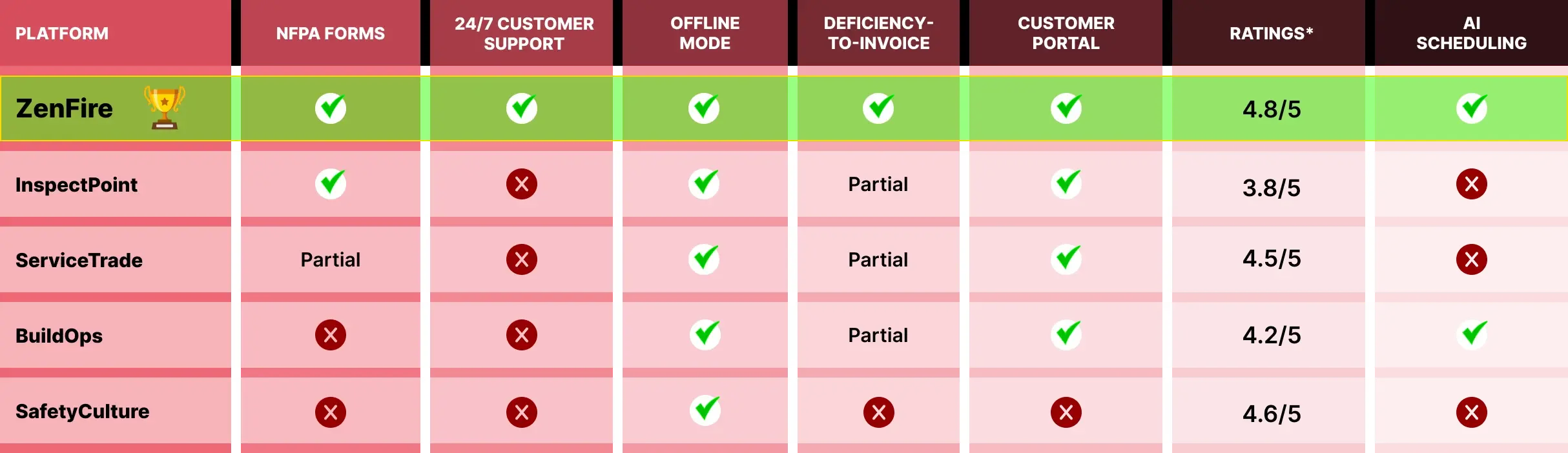
Final Thoughts: What Do You Need: Fire Department Software OR Fire Inspection Software?
APX Fire Software is a well-built product that solves real problems for its intended audience. Municipal fire departments across North America use it to manage pre-incident planning, fire investigation, and NFIRS compliance. It does that job well. The issue is not the quality of the product. The issue is that fire protection companies are not the audience it was built for, and no amount of configuration changes will change that.
Every platform on this list was built with private fire protection companies in mind. The differences between them come down to how they balance compliance depth, operational automation, client management, and business management tooling. Choosing the right one means being honest about where your operation is today and where you need it to go.
If you are running recurring commercial inspection accounts, managing deficiency repair cycles, and trying to turn field activity into predictable revenue, the software you choose needs to support that entire chain without gaps. That is the only standard to apply when evaluating any platform on this list.
ZenFire is built for fire protection businesses that are ready for one system to handle everything. Fire alarm inspections, sprinkler compliance, AI scheduling, deficiency management, customer communication, and billing with no gaps and no workarounds.
Book a free demo today, email our team directly, or read what fire protection businesses like yours are saying about the switch.
Frequently asked questions
Why does APX Fire Software keep appearing in searches for fire protection company software?
APX Fire Software uses language in its marketing, fire inspection, NFPA compliance, mobile inspections, and life safety that is identical to the language fire protection company owners use when searching for software. The overlap in terminology creates a mismatch between search results and actual product fit.
Can APX Fire Software be configured to work for a private fire protection company?
APX Fire Software is not a configurable general-purpose platform. It is a purpose-built system for municipal fire departments, and its architecture reflects that. It has no client billing module, no proposal generation workflow, no customer-facing portal for commercial property owners, and no tools for managing recurring inspection revenue. Attempting to use it as a fire protection business platform would mean working around its fundamental design rather than working with it.
Can fire station software help fire protection companies manage their daily operations?
Fire station software is designed for the operational needs of fire departments, covering incident tracking, personnel management, training records, and emergency response workflows. Fire protection companies need a different kind of software. Platforms like ZenFire are purpose-built fire inspection software solutions that handle the full process from scheduling through to invoice, which is what separates them from fire station software designed for government departments.
What is the single most important feature to evaluate when choosing fire inspection software?
The deficiency-to-invoice workflow. Every fire protection company finds deficiencies on inspections. What separates profitable companies from average ones is how quickly and reliably those findings convert into approved proposals, completed repairs, and paid invoices.