

- Paper forms and spreadsheets silently cost you hours every week.
- The right software turns field data into reports in one click.
- NFPA compliance should be automatic, not a manual task.
- ZenFire connects scheduling, forms, and reporting in one place.
- Less admin means faster invoicing and more time on actual inspections.
Running a fire protection business means there’s always something competing for your attention. Recurring inspections, NFPA compliance, field teams, client reports, the list doesn’t stop. And for most contractors, the paperwork quietly starts eating into more of their day than the actual work. That’s why more fire professionals are turning to the best fire protection software to bring order to their operations and get their time back.
The truth is, most fire protection companies are still running on outdated processes, spreadsheets, paper-based inspection forms, and manual follow-ups. Modern fire inspection software streamlines inspections by automating and simplifying the process, while also supporting comprehensive fire safety management to ensure ongoing compliance and risk mitigation. The right fire inspection software doesn’t just digitize your workflow; it transforms how your entire fire protection business operates.
That’s exactly what ZenFire was built to do. Designed specifically for fire contractors and inspectors, ZenFire is the fire inspection software that handles everything from scheduling and digital inspection forms to compliance reporting and real-time field updates.
Table of Contents
Why Most Fire Contractors Are Losing Time & Money Without Realizing It?
Think about what happens in a typical week. A technician completes a fire sprinkler inspection in the field, writes notes on paper, comes back to the office, types everything into a report, sends it to the client, and then manually logs it into a spreadsheet for compliance tracking. That’s the same inspection data entered three or four times. Every fire protection business doing this is paying for those extra hours in overtime, in errors, and in delayed invoicing.
By using workflow automation and inspection tracking features, fire inspection software helps manage inspections more efficiently, reduces manual errors, and streamlines the entire process from scheduling to reporting.
The fire protection industry has a unique challenge: fire inspections are repetitive, deadline-driven, and audit-sensitive all at once. A missed fire sprinkler inspection or a delayed fire alarm report doesn’t just cost you a client; it can create real liability. Yet many fire protection businesses still rely on processes that were never built for that kind of precision.
The fire protection professionals who are trying to scale, whether they are adding more technicians, taking on larger commercial contractors, or expanding to new service areas, should switch to fire inspection software.
Why Your Fire Inspection Workflow Needs an Upgrade?
There’s a difference between a fire inspection process that works and one that works well. Most fire protection businesses land somewhere in the middle. They get the job done, but the path from scheduling a fire inspection to delivering a compliant report to the client is longer and messier than it needs to be. Meeting inspection requirements and performing routine inspections can be especially challenging without proper data management and compliance features to ensure all records are organized and regulatory standards are met.
Here are some honest signs that your current inspection workflow needs a change:
You’re still relying on paper or spreadsheets
Paper-based inspection forms and manual spreadsheets introduce errors, slow down reporting, and make compliance documentation a nightmare when an audit comes around. By using digital forms, the process is streamlined, and accuracy is improved, making it easier to ensure compliance with NFPA standards and efficiently document fire safety inspections. Digital inspection forms aren’t just faster, they’re more accurate and far easier to track.
Missed inspections and deadlines
Fire sprinkler systems, fire suppression systems, fire extinguishers, and fire pumps each has its own inspection schedule. Tracking all of that manually across multiple clients is where things get difficult. Recurring inspections need automation, not calendar reminders.
Reports take hours instead of minutes
Manually compiling fire inspection reports from field notes is one of the biggest time drains in the fire protection industry. Capturing all inspection details, such as customer data, inspection history, and compliance status, is crucial for accurate reporting. If your team is spending more than 15 minutes on a single report, that’s a process problem, not your team’s.
No real-time visibility into your field team
Without live updates from the field, the office is always playing catch-up. Dispatching technicians efficiently, managing job history, and responding to urgent requests all become harder when you don’t know where your team is or what stage a job is at.
Why is ZenFire the Best Fire Inspection Software for Contractors?
There’s no shortage of field service management software on the market. The problem is that most of it wasn’t built for fire protection. It was built for general contractors and then adapted, but ZenFire is different. It was built from the ground up for fire protection businesses, specifically for contractors and inspectors who need a platform that understands the difference between a fire sprinkler quarterly inspection and an annual fire pump test, without having to configure everything themselves.
ZenFire is designed for the life safety industry, serving life safety companies and project contractors who require efficient management of fire equipment inspections, maintenance, and compliance.
Purpose-Built for Fire Contractors & Inspectors
ZenFire isn’t a generic field service management platform with fire inspection features bolted on. Every part of the platform, from the NFPA-compliant digital inspection forms to the deficiency management workflow, was designed with fire protection contractors and inspectors in mind.
Compared to other specialized fire inspection software platforms like Inspect Point, which is known for offering the deepest library of pre-built NFPA-compliant forms in the industry, ZenFire is also purpose-built to streamline inspection workflows and ensure regulatory adherence.
When fire protection companies use general-purpose tools, they spend more time managing the software than running their business. ZenFire completely changes that; the platform handles the complexity so your team can focus on getting fire inspections done right.
Everything You Need in One Platform
ZenFire is an all-in-one solution designed to eliminate the frustration of juggling multiple tools in the fire protection industry. Instead of using one system for scheduling fire inspections, another for generating inspection reports, a separate spreadsheet for compliance tracking, QuickBooks for invoicing, and something else entirely for communicating with clients, ZenFire integrates all these functions into a single platform.
Scheduling, digital inspection forms, compliance reporting, deficiency management, invoicing, and customer communication are all connected. When a technician completes a fire sprinkler inspection in the field, that data flows directly into the inspection report, which connects to the invoice, which syncs with QuickBooks; you need to enter data multiple times. As a cloud-based software platform, ZenFire enables seamless access and updates from anywhere, streamlining fire protection operations and ensuring your team always has the most current information.
Compliance-Ready From the Moment You Log In
Staying compliant with life safety regulations isn’t optional for fire protection companies; it’s the job. ZenFire’s compliance engine is built to make that easier, not harder. With built-in compliance features, ZenFire simplifies adherence to industry regulations and standards. Pre-built inspection templates are aligned to NFPA standards, compliance workflows are automated, and inspection history is stored and organized so that audit preparation takes minutes.
For fire protection professionals operating across multiple sites and clients, having a compliance engine that runs in the background, tracking inspection completion, flagging overdue items, and keeping records audit-ready is not a luxury; it’s a necessity. Fire inspection software designed for the fire protection industry typically includes comprehensive NFPA compliance features.
What ZenFire Can Do For Your Team?
Here’s a closer look at the key features that make ZenFire the best fire inspection software for fire contractors and inspectors in 2026. In addition to ZenFire’s robust capabilities, specialized reporting tools like building reports are essential for detailed inspections, regulatory compliance, and comprehensive documentation, especially for large organizations. For example, BuildingReports’ ScanSeries is utilized for compliance documentation and leverages barcode and NFC scanning for asset verification.
Smart Scheduling & Dispatch
ZenFire offers a special drag-and-drop scheduling interface that makes it easy to assign, manage, and track fire inspections across your entire team. You can schedule inspections for fire sprinklers, fire extinguishers, fire pumps, fire alarm systems, and fire suppression systems, all with automated reminders sent to both your team and your clients. Recurring inspections are fully automated, so no inspection falls through the cracks.
Technicians get access to their full schedule, customer location, and job history right on their mobile app. When the day starts, everyone knows exactly where they need to be and what they need to do.
Digital Inspection Forms & Custom Checklists
ZenFire’s digital inspection forms let technicians complete fire safety inspections directly on their mobile devices, capturing photos, notes, and deficiency details in real time. Forms are pre-built to meet NFPA compliance standards, so there’s no guesswork about whether you’re documenting the right things.
You can also customize forms to match your specific service operations, client requirements, or regional safety regulations. ZenFire has the right inspection form ready, whether you’re inspecting fire sprinkler systems, running a fire alarm test, or checking fire extinguishers across a commercial building. Technicians can complete inspections even when offline data syncs automatically once connectivity is restored.
Automated Compliance Tracking & Reporting
Generating professional fire inspection reports used to take hours; with ZenFire, it takes one click. The platform auto-generates comprehensive fire inspection reports from the data captured in the field. There are no manual compilations, no formatting headaches, no chasing technicians for missing details. With robust inspection tracking, ZenFire ensures all inspections are accounted for throughout the process.
Reports are compliant, professional, and ready to share with clients or authorities having jurisdiction (AHJs) immediately after an inspection is complete. For fire protection businesses that handle large volumes of inspections, the ability to download inspection reports instantly and automate compliance reporting is a genuine game-changer.
When selecting the best fire inspection software, it’s important to consider features like NFPA-compliant templates and mobile-friendly interfaces.
Real-Time Field Updates & Mobile Access
The gap between the field and the office is one of the most common headaches in fire protection. ZenFire removes it, technicians can update job status in real time from their mobile app, and the office sees those updates instantly. ZenFire supports inspections and documentation for all types of life safety systems, including fire alarms, extinguishers, sprinklers, and more, ensuring comprehensive management and compliance. Whether a fire sprinkler inspection ran long, a deficiency was found that needs quoting, or a technician is on their way to the next job, the office always has an accurate picture of what’s happening.
The mobile app works on iOS devices and is designed to be intuitive. Inspectors can complete inspections, capture inspection data, access job history, and communicate with the office without switching between multiple tools or dealing with a steep learning curve.
Customer Portal & Seamless Communication
Fire protection clients want transparency; they want to know their fire safety equipment has been inspected, their inspection reports are ready, and their compliance is in order. ZenFire’s customer portal gives clients exactly that without even giving a call to your office.
Clients can access their inspection history, download inspection reports, review deficiencies, and approve proposals directly through the portal. ZenFire also sends automated reminders to clients ahead of upcoming fire inspections, so scheduling runs smoothly.
Why There Is No Going Back: ZenFire vs Manual Processes?
If you’re still on the fence about upgrading your process, this comparison makes the choice simple. See how manual fire inspections stand up against the ZenFire workflow and how the right software eliminates your problems.
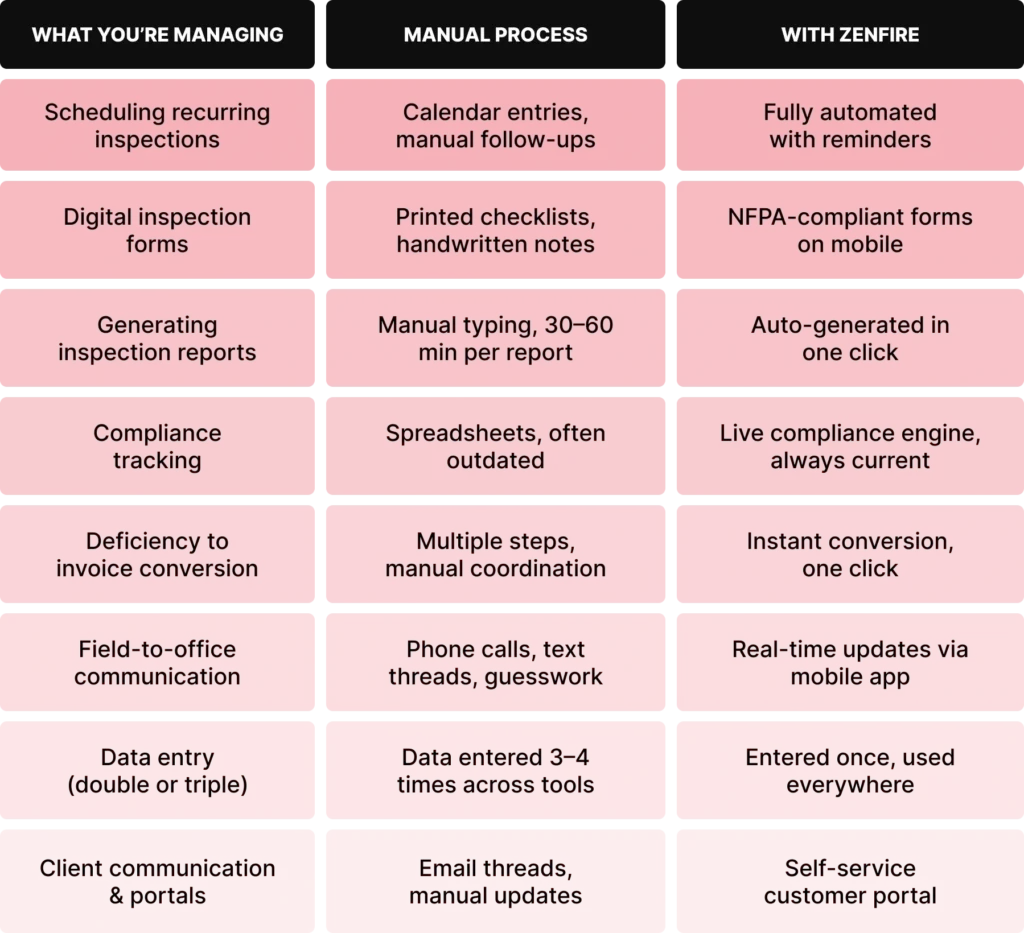
When considering the best fire inspection software cost, it’s important to evaluate some features. Pricing typically ranges from $25 to $100+ per user per month, depending on features and team size. Don’t just look at the subscription price; factor in the total investment, including integration, training, implementation, and potential add-ons.
According to ZenFire, users report a 55% reduction in administrative tasks and a 25% reduction in administrative costs. For a fire protection business doing 150+ inspections a month, that kind of efficiency gain directly impacts profitability.
“ZenFire lifted a huge weight off our shoulders. The moment we switched from paper tickets to the platform, everything became faster, more organized, and much easier to track.” –Gabriela, Director of Operations, Pastion Industries.
Fire protection teams that switch from paper-based or patchwork digital processes to ZenFire describe the same experience: less time on admin, more time on actual fire inspections, and a back office that finally feels under control.
Selecting the best fire inspection software solution requires careful consideration of features, cost, and setup requirements to ensure it meets your organization’s needs.
Final Thoughts: Ready to Transform Your Fire Inspection Process?
Starting with ZenFire is Easier Than You Think
The best fire inspection software isn’t the one with the most features; it’s the one your team will actually use every day, in the field, without friction.
ZenFire offers a smooth onboarding process with dedicated support, minimal setup, and predictable pricing that scales with your team. There’s no complex implementation and no months-long training cycle. Fire protection professionals can be up and running quickly and start seeing the difference in how they manage fire inspections within the first week.
The fire protection industry is only getting more demanding. According to the report of Grand View Research, the US fire protection system market is $25.94B in 2024, growing at 3.6% CAGR, which means fire protection professionals who get their operations right stand to gain a lot.
ZenFire is the fire inspection software built to help you stay ahead of all of it. From scheduling and digital inspection forms to automated compliance tracking and one-click reporting, it handles everything so your team can focus on what actually matters: keeping buildings safe and your fire protection business growing.
If you’re serious about running a better fire protection business, one where fire inspections run on time, reports go out fast, and compliance is never in question. ZenFire is where to start. Book a free demo today.
Frequently Asked Questions

Get Insights Delivered Straight
To Your Inbox!
Related Reading

Why Your Field Software Management Software Needs QuickBooks Integration
Zentrades Why Your Field Service Management Software Needs QuickBooks Integration Read More Request Demo...
Read More
ZenTrades How To Manage Electrical Service Agreements Like...
Read More
ZenTrades The Best 5 Jobber Alternatives In 2023...
Read More